AIE vs other Accelerators#
The AIE architectures were designed with Machine Learning in mind. But today most of these applcations are run on GPUs. So why would one prefer to run ML tasks on an AIE? And how would the performance compare?
The AI Engine architecture is optimized for deterministic, low-latency machine learning workloads, especially in embedded and real-time systems. Unlike GPUs, which rely on massive parallelism and dynamic scheduling, the AIE family can issue deterministic instructions for computation and data movement. This fine control in the hardware makes them ideal for edge inference tasks where latency, power efficiency, and tight coupling with pre/post-processing logic (like FPGA fabric) are critical. While AIEs won’t replace GPUs for general-purpose deep learning because of the massive parallelism required for such training and the mature development space surrounding ML for GPUs, AIEs can still perform well in embedded ML pipelines requiring tight time constraints and low power.
For our own satisfaction we explain some of the architectural differences in more detail in the rest of this page.
The biggest difference is the Data flow emphasis. We hope you may make some sense of this here. While the AIE family uses dataflow programming, the architecture itself is similar to that of a dataflow architecture. Note that ‘dataflow’ term in Dataflow Programming and Dataflow Architecture are not supposed to be used in the same context, and we will not be using the latter term as the AIE is not a true dataflow architecture, but we hold that it bares similarities to one.
And the dataflow Programming is most exemplified by how the memory is turned on its head. Instead of the regular memory hierarchy that CPU and GPU architecture hold, the AIE Tiles each hold their own memory with scratchpad memory instead. Meaning each piece of datum is given a unique address. Here’s a look at the traditional memory:
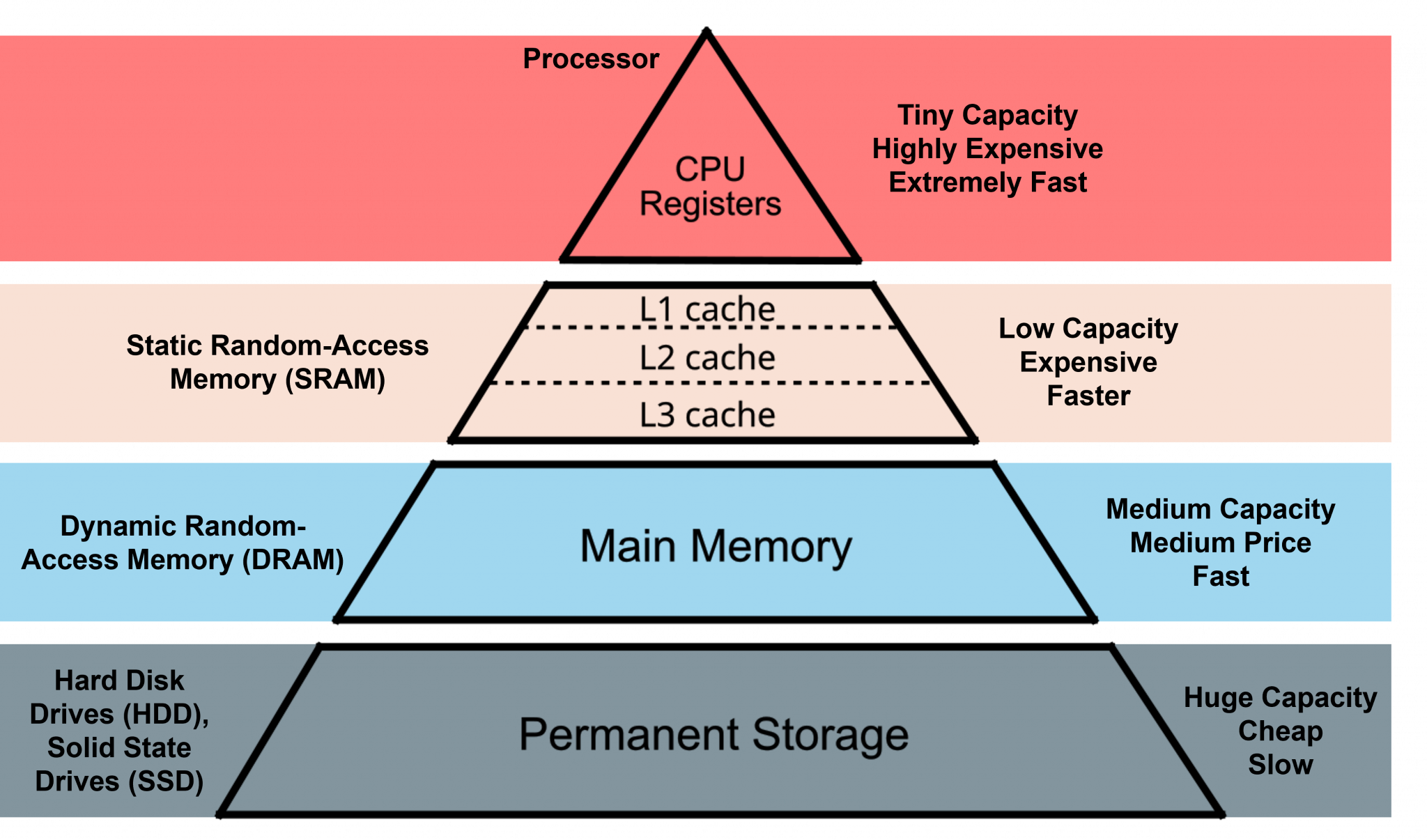
Traditional Memory Hierarchy.#
Source: SPEAR [1]
And in CPUs and GPUs you can see how caches are reused and shared between cores. If memory address isn’t found in cache, aka a cache miss, then it moves onto the next layer:
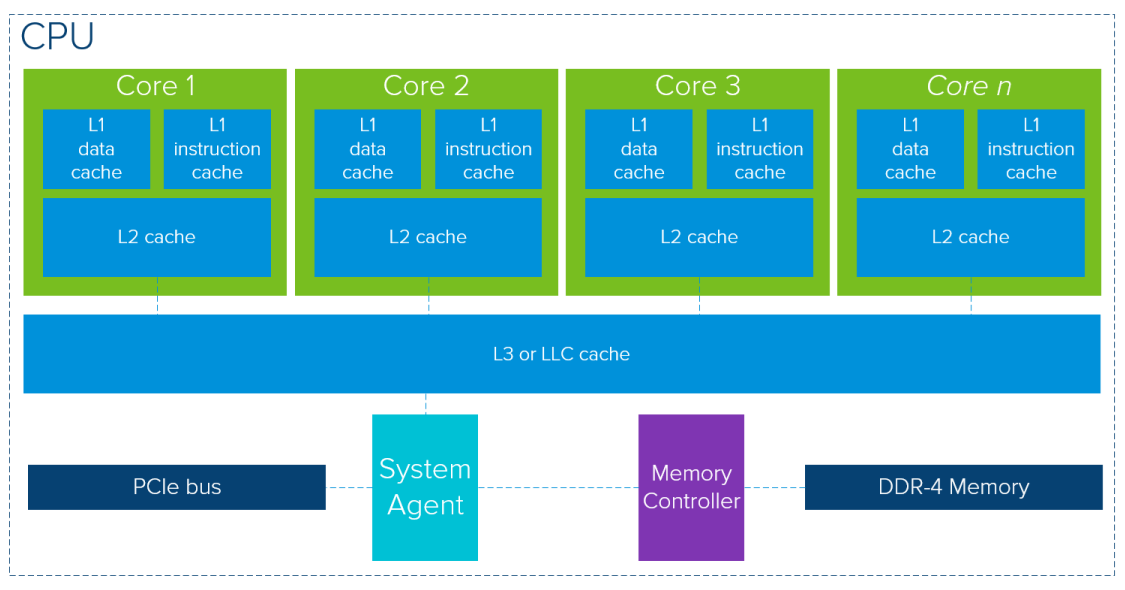
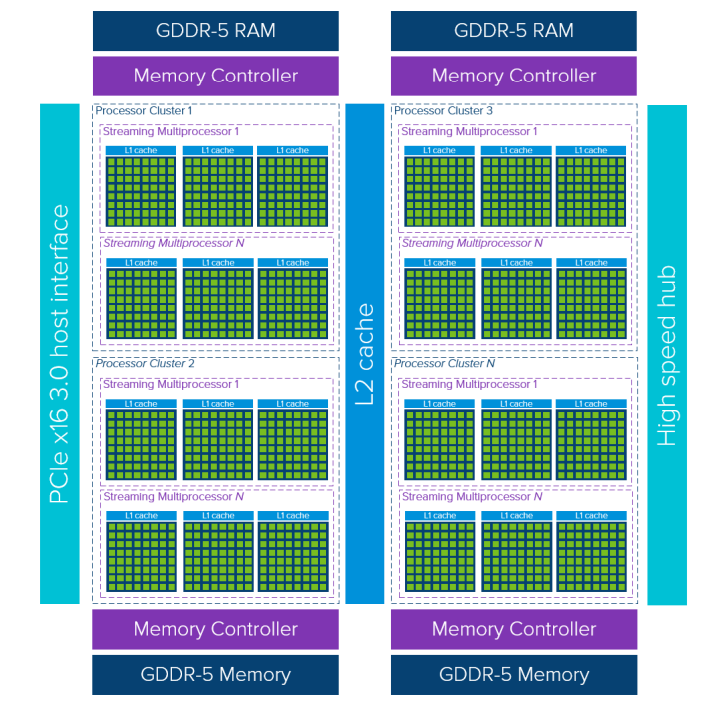
Source: VMWARE [2]
Because the architecture revolves around this idea of dataflow graphs and that data is data can be changed, produce new outputs, and sent to other kernels, the hardware reflects this nature. The hardware units, aka the AIE Tiles, perform some computation(s) and will move the data to be used by some other unit. And while this form of programming and thinking is possible on CPUs and GPUs, they are not designed around this. There’s less focus on latency over thoroughput than a CPU, yet less focus on latency over throughput than a GPU. Each tile itself holds its own memory, and any data not stored in a tile (by either the AIE Core’s registers or in the memory banks) means going off chip, or more accurately to the rest of the SoC.
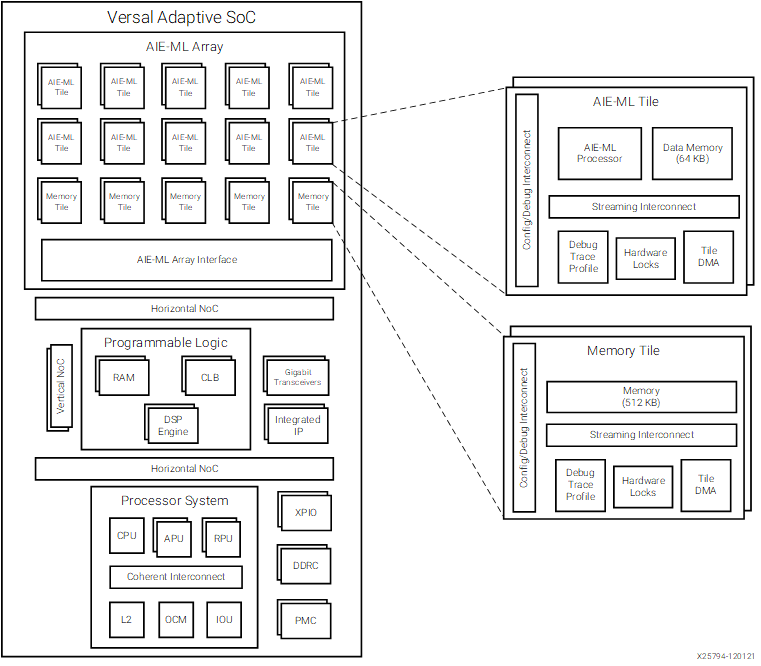
AIE-ML Tiled architecture. Note that we haven’t mentioned the Memory Tiles, exclusive to the AIE-ML, but they are essentially just more AIE tiles without the compute.#
Source: AMD Docs [4]
For example, say we want to write 2 kernels that we want to do something, say one does a computation and the second encrypts that output. In a traditional CPU and GPU architecture these kernels are loaded as instructions into the cores of their systems, and only when the first kernel is finished does the second run. Furthermore to share information in between kernels they will have to have written to a shared cache, where nearly all other cores can view and share the same info. But in the AIE we can load different kernels to neighboring tiles, and then perform our kernels on that data while sharing that data availability to a very limited amount of neighbors or specific tiles. And while it is technically possible to assign different kernels to different CPU cores/GPU, this isn’t very effective or a design that is kept in mind.
A Look In Depth#
This will compare the AIE vs other architectures in greater detail. We suggest being familiar with a University level understanding of computer architecture or equivalavently just using your browser engine to search these terms.
CPUs#
CPUs are usually designed for low-latency and general usage. With this goal in mind, CPUs usually have multilayered memory hierarchy, anticipate instructions with branch prediction and lookahead execution, can begun to run instructions despite a stall with out-of-order execution or simultaneous multithreading, and will divvy up the instructions can execute at at time within a core’s units (superscaling execution) or between cores (multicore). A CPU will employ all these techniques to lower latency and make sure the CPU is fed with instructions to run, even if that means executing a different process.
GPUs#
A GPU places a lower emphasis on latency and instead on thoroughput. This is already evident by the lower clock speeds GPUs normally have when compared to CPUs. While CPUs have a couple of cores on consumer end systems and hundreds on server systems, GPUs usually have thousands of units dedicate for processing. Example: The NVIDIA GeForce RTX 4080 has 9728 Cuda Cores (Shading Units) and the Radeon RX 7900 XTX has 6144 Streaming Processors (Shading Units). These units are fundamentally much simpler that CPU cores, yet the amount of them allows for a very large amount of data to be fed through and computed. Additionally, the memory hierarchy differs a bit as well. Though there is still a memory hierarchy, there is usually some larger memory size on the lowest level on chip. On the GeForce RTX 4080 this is 128KB->64MB->16GB and on Radeon RX 7900 XTX 64KB->256KB->6MB->96MB->24GB.
NPUs (AMD AIE)#
Probably the biggest difference in compute from the AIE processors is that they are VLIW processors. Instructions can issue out 6 operations. [3] This allows for a single instruction to use dedicated scalar/vector units, the load and store units (AGU units), and internal register movements, essentially computing and moving data at the same time.
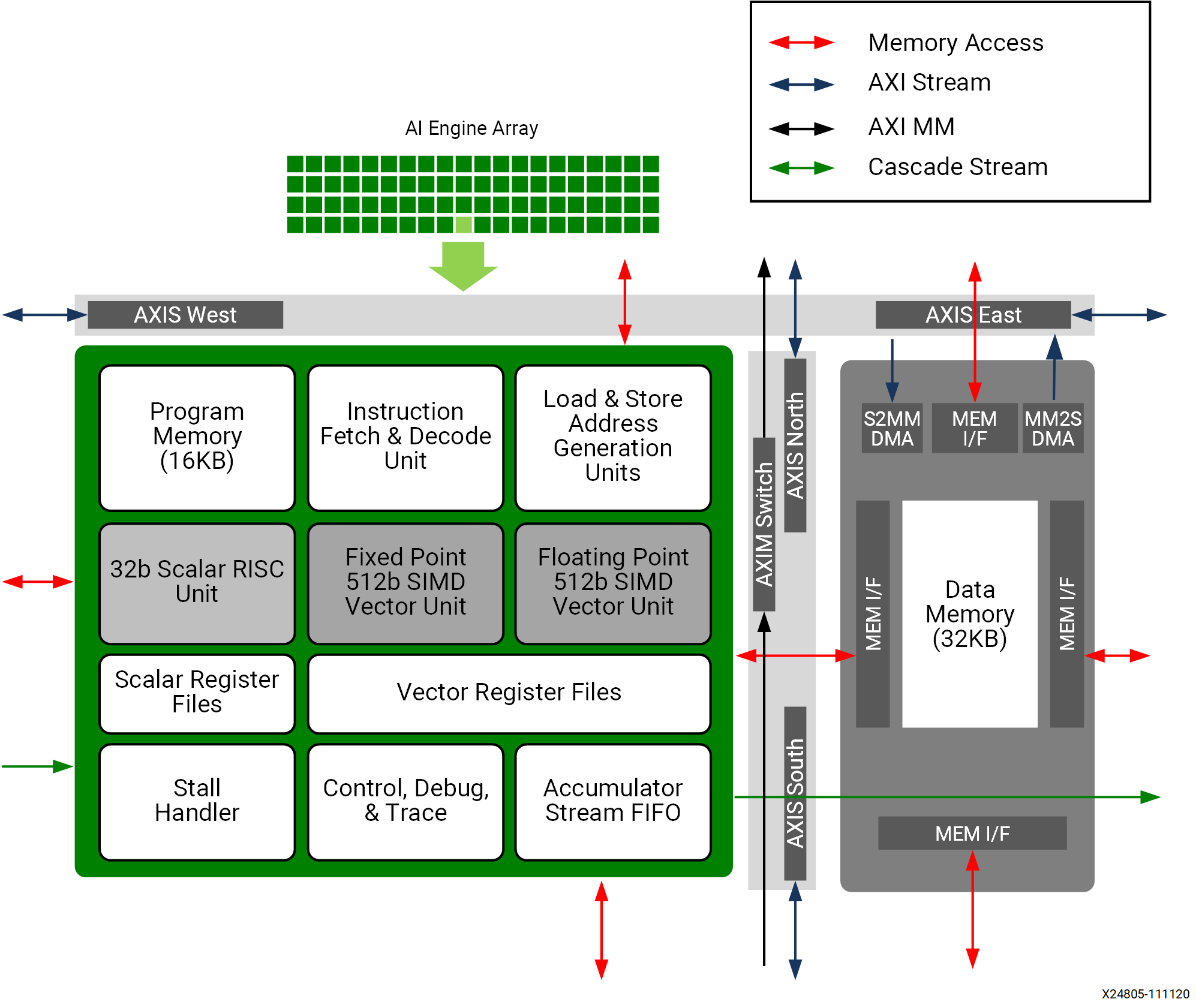
A single AIE-1 Tile. You can see the AIE processor on the left, and the AIE memory module on the right. Note that on the AIE-1, the AIE processor and the memory module are mirrored depending on the row, alternating in even and odd rows. On the AIE-MLvX, there is no alternating. All tiles are facing the same direction.
Two Central Challenges#
Limited Streaming Bandwidth and Tile Placement: Limited streaming bandwidth between tiles makes the physical placement of kernels a critical factor. Since the architecture is designed around a network of interconnected tiles, data transfers between non-adjacent tiles can quickly become bottlenecked by network congestion and the relatively small AXI4 stream width of 32 bits. As a result, programmers are compelled to carefully co-locate tightly coupled kernels in neighboring tiles and minimize the distance that data must travel often done through AIE Vitis Constraints. This often requires thoughtful partitioning of algorithms and a strategic approach to mapping workloads, ensuring that the most communication-intensive operations occur between adjacent tiles to maximize throughput.
Local Memory Constraints: Second, the severe memory constraints on each local tile further complicate efficient programming. With only a small amount of dedicated memory per tile (32KB), developers must fit code, data, and input/output buffers into a very limited space. Programmers are often forced to break down large datasets into smaller blocks, carefully schedule memory usage, or offloading strategies to external memory to avoid stalls and underutilization of compute resources. These challenges demand an understanding of the AIE’s architectural nuances and a deliberate placement of buffers data sharing between neighboring kernels.
In Making AIE Development Easier, we seek to address these challenges by providing a set of references and technniques to help developers on their AIE programming journey.