Using Constraints#
When building for the AIE a dataflow graph will be constructed. Based on this graph the AIE Compiler and placer will attempt to put the buffers, path of the streams, and kernels in a manner to minimize the latency and access of data. How does it do so and what it actually considers… I can only get back to you on that. If you believe that you can reduce these by having better placement or changing certain options the placer/compiler considers, then one of the options you have to do so is to apply some constraints.
We note that constraints are only a minimal part of the optimizations or configuration. There is a lot more that can be done. The AI Engine Kernel and Graph Programming Guide shows a lot more options. FIFOs, graph structures, connections, and a lot more.
A simple unconstrained Kernel#
Imagine a kernel that takes a buffer, does some computation, and returns it into another buffer. Where is that buffer stored? Can the neighboring kernel access it? Where is the buffer aligned to? We’ll show an example with an extremely simple kernel that does not computation, but grabs one data from a buffer and moves it to a neighboring buffer. The kernel code looks like the following:
kernels.cpp:
#include <aie_api/aie.hpp>
#include <adf.h>
#include "include.h"


void move(
    adf::input_buffer<int16>& mov_in, adf::output_buffer<int16>& mov_out
) {
    auto inIter1=aie::begin(mov_in);
    auto outIter=aie::begin(mov_out);
    *outIter++=(*inIter1);
}
If you’ll notice, this kernel will just take a single input. We don’t wish to do anything here, just show the purpose of constraints. You’ll also notice that the kernel does not care about placement. These restrictions should be kept inside the graph code. Inside graph.h:
#include <adf.h>
#include "kernels.h"
#include "kernels/include.h"
#include <aie_api/aie_adf.hpp>

using namespace adf;

class AIEGraph : public adf::graph {
private:
  kernel kernel_move;
public:
  input_plio plio_in;
  output_plio plio_out;

  AIEGraph() {

    plio_in = input_plio::create(plio_64_bits, "data/input.txt");
    plio_out = output_plio::create(plio_64_bits, "data/output.txt");
    kernel kernel_move = kernel::create(move);


    runtime<ratio>(kernel_move) = 0.9;

    dimensions(kernel_move.in[0]) = {16};
    dimensions(kernel_move.out[0]) = {16};

    connect(plio_in.out[0], kernel_move.in[0]);
    connect(kernel_move.out[0], plio_out.in[0]);

    source(kernel_move) = "src/kernels/kernels.cpp";

  }

};
And this code will leave to the vitis placer to decide where everything is stored and how it is stored. If we want more control over this, we can use constraints. We append the following to the AIEGraph() constructor.
// Constraints //

// Single Buffering is an inefficient technique, but uses half as many buffers (Don't do this for speed. You want the ping-pong (double buffering) feature)
single_buffer(kernel_move.in[0]);
single_buffer(kernel_move.out[0]);

// Buffer the location of the memories:
location<buffer>(kernel_move.in[0]) = bank(0, 7, 0);
location<buffer>(kernel_move.out[0]) = bank(1, 7, 0);

location<kernel>(kernel_move) = tile(0, 7);
location<stack> (kernel_move) = address(0, 7, 24576);
While we have chosen to append this to the end of the constructor, the graph code does not care where you define the constraints. But we will write the constraints after we define the rest of the graph readability. Below we show a comparison and the differences.
Unconstrained |
Constrained |
|---|---|
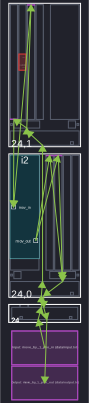
|
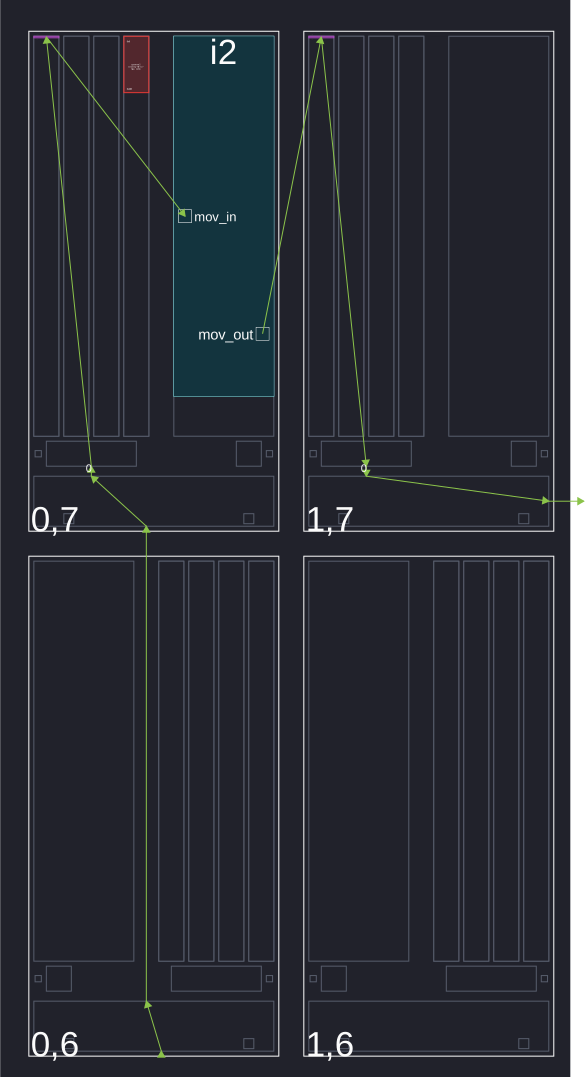
|
Code |
Difference |
|---|---|
single_buffer() |
|
|
Controls what bank is used. This does not necessarily align the buffer within the bank. |
|
Controls what tile the kernel will be in. |
|
Defines address within a tile’s memory. Determines bank placement |
Snake Movement#
It almost looks like a shoots and ladders board game. We can move our data and choose how it goes from kernel to kernel. The kernel code is exactly the same as above, but the main difference is the graph code. Below, we create variables for the dimension of this snake. The vck190 fpga board has 8 rows and 50 columns of tiles. We choose 400 to let our snake path travel to the very end:
kernels/include.h:
#ifndef FUNCTION_INCLUDES_H
#define FUNCTION_INCLUDES_H

#define PLATFORM_WIDTH 50
#define PLATFORM_HEIGHT 8
#define N 400

#endif
The graph code will define constraints. You’ll also notice the definition of multiple kernels as an array.
graph.h
#include <adf.h>
#include "kernels.h"
#include "kernels/include.h"
#include <aie_api/aie_adf.hpp>

using namespace adf;


class AIEGraph : public adf::graph {
        private:
                kernel kernel_move[N];
        public:
                input_plio plio_in;
                output_plio plio_out;

                AIEGraph() {

      plio_in = input_plio::create(plio_64_bits, "data/input.txt");
      plio_out = output_plio::create(plio_64_bits, "data/output.txt");


      for (int i = 0; i < N; i++) {
        kernel_move[i] = kernel::create(move);
        runtime<ratio>(kernel_move[i])    = 0.9;
        dimensions(kernel_move[i].in[0])  = {16};
        dimensions(kernel_move[i].out[0]) = {16};
        source(kernel_move[i])            = "src/kernels/kernels.cpp";
      }


      // connection of kernels
      for (int i = 0; i < N; i++) {

        // First kernel (use plio)
        if (i == 0){
          connect(plio_in.out[0], kernel_move[i].in[0]);
        }

        // Connect to next kernel if it exists
        if (i < N-1) {
          connect(kernel_move[i].out[0], kernel_move[i+1].in[0]);
        }

        // Last kernel (use plio)
        if (i == N-1) {
          connect(kernel_move[i].out[0], plio_out.in[0]);
        }
      }


      // Constraints //

      // Single Buffering is an inefficient but easier to keep buffers in one place (Don't do this for speed. You want the ping-pong)
      for (int i = 0; i < N; i++) {
          single_buffer(kernel_move[i].in[0]);
          single_buffer(kernel_move[i].out[0]);
      }

      // Placing the buffers and kernels where they are wanted
      // We want a snaking pattern starting from the top left,
      // so the for loop indexing starts j at the height
      for (int n = 0; n < N; n++) {
        // y coordinate of the tile
        int j = PLATFORM_HEIGHT - 1 - n/PLATFORM_WIDTH;
        // If an EAST/WEST Direction tile then change the x coordinate
        // x coordinate of the tile
        int i = (j%2)?
          (n%PLATFORM_WIDTH)
          :(PLATFORM_WIDTH-1-(n%PLATFORM_WIDTH));

          location<kernel>(kernel_move[n]) = tile(i, j);
          location<stack> (kernel_move[n]) = address(i, j, 24576);
          if (j%2) { // EAST Direction Tile
            if (i == PLATFORM_WIDTH - 1) { // Eastern most tile
              location<buffer>(kernel_move[n].in[0])  = address(i, j, 0);
              // Check if there exists a row below it
              location<buffer>(kernel_move[n].out[0]) = address(i, (j)?j-1:j, (j)?0:8192);
            } else { // just write to the next one in a line
              location<buffer>(kernel_move[n].in[0]) = address(i, j, 0);
              location<buffer>(kernel_move[n].out[0]) = address(i+1, j, 0);
            }
          } else { // WEST Direction Tile
            if (i == 0) { // Western most tile
              location<buffer>(kernel_move[n].in[0])  = address(i,   j, 0);
              // Check if there exists a row below it. Write to second memory bank if it exists.
              // This should be an unecessary ternary since there is always an even number of rows
              location<buffer>(kernel_move[n].out[0]) = address(i, (j)?j-1:j, (j)?0:8192);
            } else { // just write to the next one in a line
              location<buffer>(kernel_move[n].in[0])  = address(i,   j, 0);
              location<buffer>(kernel_move[n].out[0]) = address(i-1, j, 0);
            }
        }
      }
    }
};
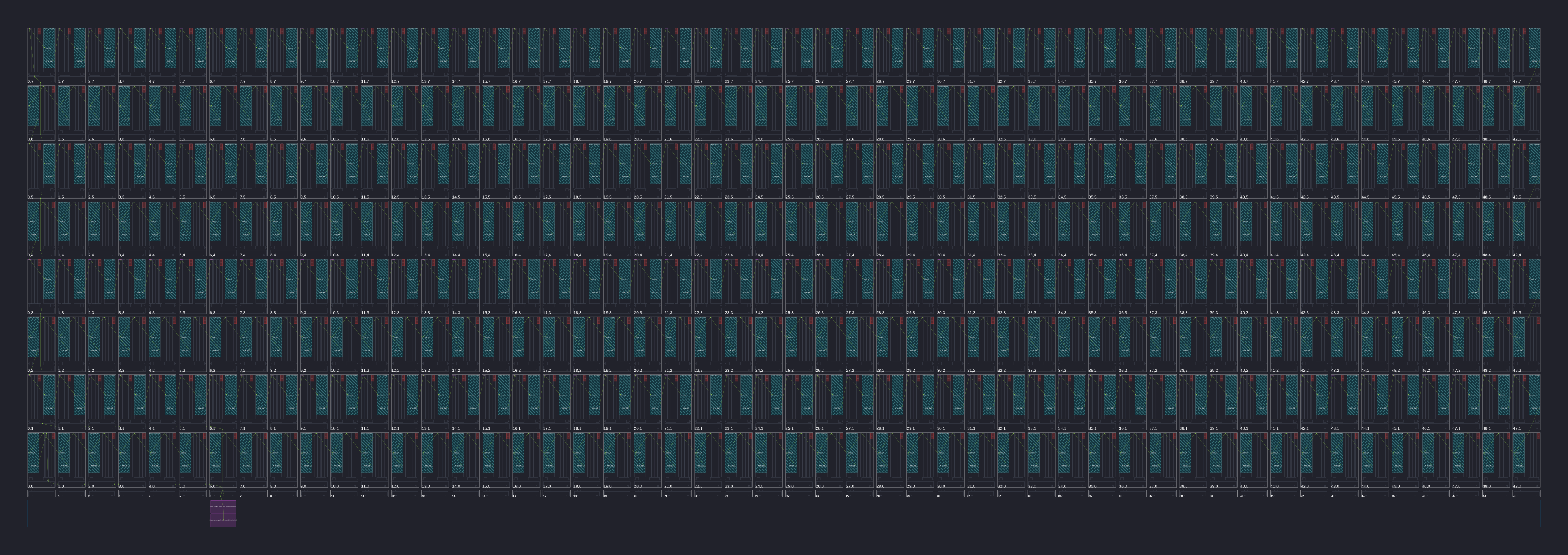
Feel free to click on the array diagram directly. They are vector graphics, so you can really zoom in.